
Introducing Email Scrubber 7.10: Even More Control Over Email Component Results

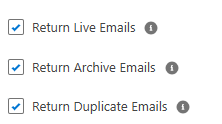
We released 7.9 with three new checkboxes, Return Live Emails, Return Archive Emails, and Return Redundant Emails. A number of clients were elated. Many more contacted us asking for even more control. It turns out they needed more than a simple set of "on" and "off" toggles.
It's great seeing all the various implementations and approaches to the same problem. If better is being able to turn around a solution that fits all the needs.

From Checkboxes to Picklists
The Return Live Emails / Return Archive Emails checkboxes are being replaced with a single, more capable control: Live Email Display, a picklist with four settings:
All Live Emails -> (the default, same as today) for customers looking to display all live emails in the component
No Live Emails -> for customers looking to display archive emails only (i.e. no live emails)
Live – Redundant Only -> for customers looking to only display live emails that have been flagged as redundant (but have not been archived yet)
Live – Non-Redundant Only -> for customers looking to display only live emails that have not been flagged as redundant/duplicates
New Configuration Options
An Archive Email Display picklist mirrors the same four settings on the archive side, so you can independently control live and archive filtering with the same level of precision on both.
Use case: Say you want to lay out a Case page with two separate views. The first shows every live email, no filtering, since that's the active conversation your agents need to see in full. Below it, a second component shows only the archived history, with duplicates already stripped out, and only appears at all when there's actually archived content to show. Set the first component's Live Email Display to "All Live Emails" and Archive Email Display to "No Archive Emails." Set the second component's Live Email Display to "No Live Emails" and Archive Email Display to "Archive - Non-Duplicates Only." Two components, two independent, purpose-built views, on the same page.
Keep the enhancement requests coming. This is exactly how Email Scrubber gets better.
Questions about how to configure any of this for your org? Reach out anytime at sean@sproketlogic.com.

Comments