
Introducing Email Scrubber 7.9: More Control Over Email Component Results

More and more of you are leveraging the Email Scrubber Lightning component directly on your record pages. How do we know? The enhancement requests for your unique use cases keep coming in. And that's a great problem to have. It means the component is becoming part of how your teams actually work with email messages every day.
Let's take a look at the new filter features rolled into Email Scrubber Version 7.9.
New Filter Options
We've added three new checkboxes to the component's configuration: Return Live Emails, Return Archive Emails, and Return Redundant Emails.
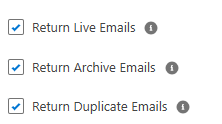
All three default to their current behavior, so nothing changes for existing installs unless you decide to turn them off. However, if you want more control over what the component actually displays, here's what they unlock.
Return Live Emails / Return Archive Emails
By default, the component shows both your live Email Message records and your archived records together, in one unified view. Now you can toggle either one off independently.
Use case: Let's say you already have a standard email related-list component doing its job for live emails. You just want Email Scrubber to give you a clean, dedicated view of your archived records... nothing more. Simply uncheck Return Live Emails, leave Return Archive Emails checked, and the component becomes a focused archive viewer instead of a combined feed. It's a small change, but it opens up a lot of flexibility in how you lay out a record page. Email Scrubber doesn't have to be an all-or-nothing component anymore.
Return Redundant Emails
If you're leveraging redundant detection, you're already identifying duplicate emails so you can clean them up and reclaim storage. But once you've flagged them as redundant, do you actually want to keep seeing them in the component? Probably not. And let's be, that's one of the key points of running redundant detection in the first place.
Simply uncheck Return Redundant Emails, and the component filters those records out of the display entirely. Less visual noise, less confusion for your users scrolling through a case's email history, and a cleaner reflection of what actually still needs attention.
Why This Matters
None of these changes are flashy (but neither is Data Storage consumption reduction), but they're the kind of "quality of life" improvements that come directly from watching how real orgs are actually using the component.
Keep the enhancement requests coming. This is exactly how Email Scrubber gets better.
Questions about how to configure any of this for your org? Reach out anytime at sean@sproketlogic.com.


Comments